
Albert is your personal AI guide to Scientific Resonances and Double Coil Technology, available with a free ChatGPT account. Using ChatGPT Projects, you can set up your own version of Albert with two knowledge documents, one from each website. The same setup serves both sites.
What is a ChatGPT Project?
A Project is a dedicated area within ChatGPT where you can keep your knowledge files, instructions and conversations together. In your Albert Project, you can ask questions about either website, explore connections between the two and return to earlier discussions as your understanding develops.
What Albert Offers
● Scientific Resonances. Explore ideas about subtle energies, multidimensional models of reality and the possibility that individual consciousness is part of a Universal Consciousness.
● Double Coil. Explore the design of the Double Coil, the observations that led to its development and the questions those observations raise.
● Deep Exploration Mode (DEM). Albert’s instructions encourage a careful examination of each idea, drawing on established science where relevant and distinguishing published findings, reported observations and proposed explanations.
● A place to keep an ongoing dialogue, compare ideas and ask what further observations or experiments might help to test them.
Creating Your Own Albert Project
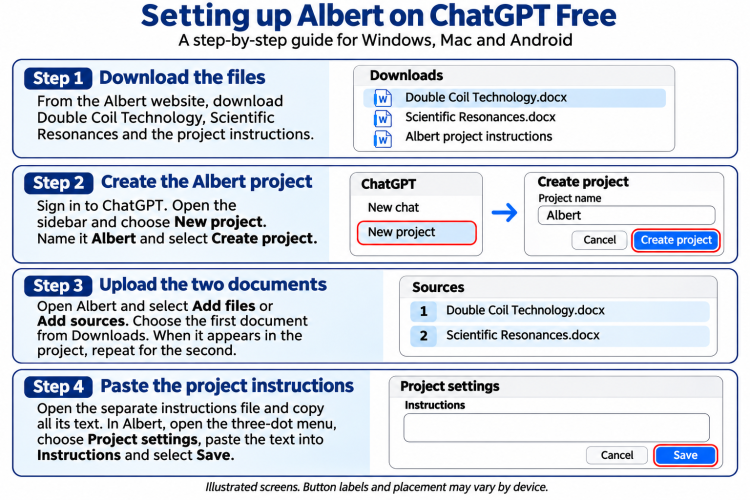
Sign in at chatgpt.com. If you’re new to ChatGPT, you can create a free account. Open the sidebar, choose New project, name it Albert and select Create project.
Download the Files and Set Up Albert
Download the two knowledge documents and the separate instructions file. Open your Albert Project and follow the steps below.
● Upload the Scientific Resonances Pillar. Choose Add files or Add sources again and select the Scientific Resonances document from Downloads.
Scientific Resonances – Knowledge (27-11-26)
● Upload the Double Coil Pillar. Choose Add files or Add sources and select the Double Coil document from Downloads.
Double Coil Technology – Knowledge (27-11-26)
● Paste Albert’s instructions. Open the separate instructions file and copy all its text. In your Albert Project, open the three-dot menu and choose Project settings. Paste the text into the Instructions field and select Save.
Albert Project – Instructions (27-11-26)
Keeping Albert Up to Date
As the material develops, we’ll make updated versions available on this page. To update a knowledge document, remove the older version from the Project and upload the new one. If Albert’s instructions change, replace the text in Project settings and select Save. You can do this within your existing Project and keep your conversations together.
In Essence
● Create one Albert Project for Scientific Resonances and Double Coil.
● Upload the Scientific Resonances Knowledge and Double Coil Knowledge as two separate files.
● Copy Albert’s instructions into Project settings and select Save.
You might begin by asking, “What would count as evidence for Universal Consciousness?” or “What led to the design of the Double Coil?”